Siri AI Tries Korean: Less App-Hopping, More Doing
IT DAILY ·
✦ AI Summary
Apple is set to officially offer Siri AI in Korean starting next week. The demonstration introduced Korean-language question-and-answer features, along with the ability to link Messages, email, the current screen, and web information to carry out app actions. Apple said the Korean version of Siri AI is in beta, and the rollout timing could change depending on the software update schedule.
Apple's AI assistant, Siri AI, is set to support Korean starting next week. On the 21st, Apple demonstrated the Korean version of Siri AI ahead of its official rollout. Apple positioned Siri AI as a tool that not only handles Korean question-and-answer queries, but also links information from iPhone Messages, email, the current screen, and web content, then carries out app actions based on that connected information.
In the demonstration, Apple showed that tasks that users would normally handle by moving between multiple apps can instead be completed within a single conversation. One example was adding event details recognized by the camera to a calendar schedule. Another example showed the assistant searching past messages for needed information, supplementing it with web data, organizing the collected details into Notes, and drafting an email.
The version used in the demonstration was a beta version. Apple said it plans to add languages including Korean, Japanese, and Spanish next week.
However, the rollout timing could change depending on the software update schedule. No exact date was specified, though the 26th was mentioned as a likely release date.
Siri AI's main features, including personal context awareness, screen recognition, web knowledge use, and app actions, had previously been made public. In this Korean demonstration, those features were presented as a sequence from personal context search to screen recognition and app execution.
In the first example, Apple showed a request to find a link to a pumpkin porridge recipe shared in a past group chat. Siri AI searched the conversation and the link, then opened the webpage. In a follow-up request, the user asked it to organize the ingredients visible on the screen by grocery section, and Siri AI sorted the items and moved them to the Notes app.
In this example, conversation search, webpage review, content organization, and note creation were linked in a single flow. There was no need to open a separate search window.
In another demonstration, Apple showed a request to identify the name of a forest trail recommended by an acquaintance in the past. Siri AI searched the saved messages for the location. In a follow-up question, the user asked for the trail's length, and Siri AI answered using web information. In this flow, there was no need to explain the subject of the earlier question again.
On this day, Siri AI also demonstrated workflows for work assistance and input recognition in sequence. First, Apple showed a work scenario in which existing meeting notes were used to summarize content, and it also presented an email draft that included action items. The drafted result was linked to the Mail app, allowing the user to review it before sending it.
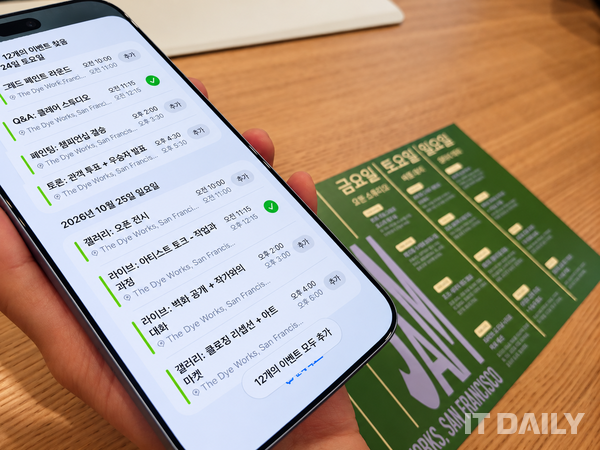
Apple then introduced a way to use the camera as an input tool. When pointed at a printed event schedule, the content was recognized, and the system suggested adding it to Calendar based on the recognition results. It was explained that calendar entries can be created from date and time information without needing to take a photo and re-enter the details.
The demonstration also defined the basis for screen recognition. Screen recognition was said to be based on the area the user is currently viewing, and not on the entire screen, but on what is displayed on the current screen. This was described as intended to improve accuracy.
Relatedly, a question was raised about whether content that appears only after scrolling down during the recipe demonstration could also be recognized. In response, the explanation was repeated that recognition is based on what is displayed on the current screen. The point of the explanation was again said to be improving accuracy.
The demonstration screen also showed Siri AI searching and displaying the pumpkin porridge recipe and meal-related information the user had requested in a past conversation. The photo credit was listed as Reporter Kim Byung-joo.
Where Siri AI processes requests depends on the task. Notifications setup, message sending, and searching for specific messages stored on the device are handled on the device itself.
By contrast, fetching web information and requests that require heavy computation are handled on the server side. Apple disclosed that it will use its own server-based Private Cloud Compute (PCC) for requests that are difficult to process on the device.
Apple said data sent to PCC is used only to process the request. It also said the data sent to PCC is not stored.
From the perspective of Korean users, how well Siri AI connects with the apps they normally use will be important. That is because, to search personal context and carry out actual actions, the relevant app must support the necessary features.
Apple has opened those features to developers. Examples presented on site included WhatsApp, Microsoft Outlook, and Craft, and the demonstration showed Siri AI finding travel information stored in Craft as personal context and responding to it.
Siri AI's practical use in Korea may not be determined solely by Korean-language recognition and generation performance. Its usefulness is likely to vary depending on whether domestic messenger, work, and lifestyle apps are supported, and factors shaping real-world usability are expected to include both Korean language performance and the level of support for personal context and app actions in domestic apps.
How well the apps Korean users use most often support integration features also affects real-world usability. As a result, Siri AI's usefulness in Korea is influenced by language performance as well as the level of support for personal context and app-action features in domestic apps.
Siri AI's processing structure is not singular. Some tasks are completed through on-device processing, while requests that require more computation are handled via the cloud.
This processing structure for Siri AI involves collaboration between Apple Foundation Models and Google Gemini. However, the specific role of each model and technology in processing individual requests has not yet been finalized, and Apple said further confirmation was needed on the day. Regarding privacy handling, Apple said user information is not shared with Google.
Conversations with Siri are saved in a separate Siri app and can be recalled and used later, and previous conversations that the user has not deleted can still be searched and continued months later. In addition, if the same Apple account is used, conversations can continue across other Apple devices such as iPhone, iPad, and Mac based on iCloud, and Siri AI is currently available in beta.
Source: IT DAILY · Kim Byung-joo
Original: https://www.itdaily.kr/news/articleView.html?idxno=242350
References
This article was produced with the help of an automated content generation algorithm.
Source: IT DAILY
View originalThis article was summarized and organized by BizCrush based on the original article from IT DAILY. For exact quotations and full details, please refer to the original article.