KakaoTalk Business Channels Expand to Individual Experts, Adding New “Career Card”
IT DAILY ·
✦ AI Summary
Kakao revamped the Channel Home and News sections of KakaoTalk Channels on the 20th.
The update adds a new screen that jointly displays News and short-form content, as well as a post format centered on photos and videos.
The scope of Business Channel conversion has been expanded to individuals with professional qualifications, and the career card can display experience and areas of expertise.
Kakao announced on the 20th that it has revamped the “Channel Home” and “News” sections of KakaoTalk Channels. Kakao has adjusted the screen layout and posting formats for KakaoTalk Channels.
The overhaul adds a new screen that displays News posts and short-form content together. It also adds a post format centered on photos and videos.
Kakao has expanded the scope of users eligible to switch to a Business Channel to include individuals with professional qualifications. As a result, individuals with professional qualifications can now apply for screening to switch to a Business Channel.
Individuals without a business registration certificate can also apply for screening to switch to a Business Channel if they submit proof of experience and qualifications. Approval through screening is required to convert to a Business Channel.
If individuals with professional qualifications pass the screening to switch to a Business Channel, they can use a feature that provides guidance on their experience and area of expertise. Through this feature, they can use a “career card,” which displays their expertise and experience and can be used to introduce themselves to channel users.
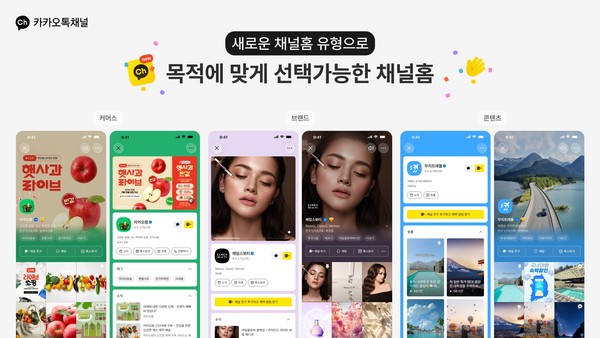
The latest overhaul expands both Channel Home and post formats, making it easier to gather and continue consuming News and short-form content. A new type of Channel Home, called a “content-based Channel Home,” has been added. The content-based Channel Home presents News and short-form posts published on the channel in a grid-style feed. After viewing individual pieces of content, users can swipe vertically to continue watching other News and short-form posts from the same channel.
Operators can choose between the existing standard type and the content-based type for their channel. Channel components include a profile photo, introduction text, and category. Business Channels can set photos, videos, and colors as the Channel Home background. They can also place shortcut buttons for channel functions, such as coupons, reservations, and calls.
“Card-style News” has been added as a post type. Card-style News can include photos and videos introducing new products, store scenes, and event venues. Up to 40 photos and videos can be attached per post. Users can view the attachments included in Card-style News by swiping left and right.
Operators can use posts to deliver a wider range of content at once by including multiple photos and videos, links, and location information. Card-style News can include one link. It can also include one location item.
Long-form writing can still be created through the existing “blog-style News” feature. This time, the News creation screen has been redesigned so editing, previewing, and publishing settings can all be handled on a single screen.
Hwang Jun-yeon, Kakao Business Domain Leader, said the purpose of the Channel Home and News screen overhaul is to strengthen channel content introductions and make it easier to browse a variety of updates. He added that Kakao plans to further enhance the service so it can support convenient communication between partners and users on KakaoTalk Channels in the future.
Source: IT DAILY · Kim Byeong-ju
Original: https://www.itdaily.kr/news/articleView.html?idxno=242317
References
This article was produced with the help of an automated content generation algorithm.
Source: IT DAILY
View originalThis article was summarized and organized by BizCrush based on the original article from IT DAILY. For exact quotations and full details, please refer to the original article.